




























Googlebook First Look: Android Laptops Finally Put Phone Integration at the Centre
Googlebook brings Android to premium laptops from Acer, Asus, Dell, HP and Lenovo, with deep phone integration, Gemini AI and some early software rough edges.
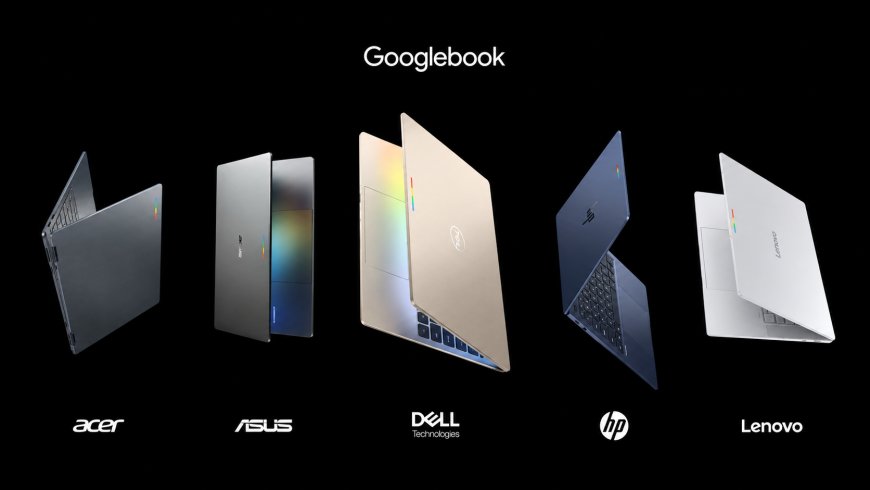
Googlebook is Google’s most serious attempt yet to turn Android into a full laptop platform, but the hardware is only part of the story. Acer, Asus, Dell, HP and Lenovo are supplying premium laptops with modern Intel and Qualcomm processors, while Google is trying to make the operating system feel like the natural desktop companion to an Android phone.
That phone connection is already the most convincing part of the experience. Apps, notifications and files can move between devices with remarkably little friction, and Google has built Gemini directly into the desktop rather than treating AI as another browser tab. The problem is that Googlebook OS still carries some of the awkwardness of both Android and ChromeOS. The result is promising, sometimes genuinely clever and clearly unfinished.
Googlebook Is More Than a Rebranded Chromebook
Google describes Googlebook as a new laptop category built on the Android technology stack while incorporating desktop foundations developed for ChromeOS. That distinction matters because the operating system is not simply ChromeOS with a new name, nor is it a tablet version of Android stretched across a laptop display.
Google’s official Googlebook launch announcement centres the platform on three ideas: premium laptop hardware, deep Android-phone integration, and Gemini Intelligence built throughout the system.
The interface initially feels familiar to anyone who has used a Chromebook. It includes a desktop, taskbar, application launcher, Chrome, and access to Google services, while Android apps come through Google Play. That familiarity lowers the learning curve, but it also means some older ChromeOS habits and limitations remain visible beneath the new branding.
Googlebook needs to prove that its combination of Android and ChromeOS foundations can become more than a polished successor to the Chromebook. Its strongest new ideas suggest it can, but the software isn’t consistently there yet.
Five Manufacturers Give Googlebook a Strong Hardware Start
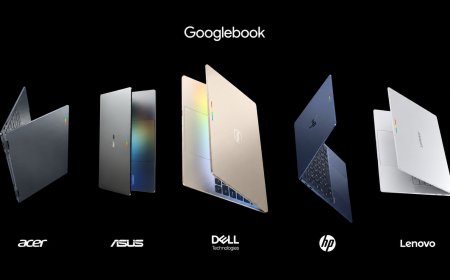
Google has avoided launching the platform around a single first-party laptop. Instead, its first generation includes flagship systems from Acer, Asus, Dell, HP and Lenovo, with prices starting at $899.
The lineup covers several form factors. Acer offers a 14-inch convertible, Asus emphasises portability, Dell’s XPS Googlebook uses Qualcomm’s Snapdragon X Elite, while HP and Lenovo provide additional premium clamshell designs. Google says every launch model includes at least 16GB of RAM and 512GB of storage.
The Googlebook lineup also mixes Intel Core Ultra Series 3 and Qualcomm Snapdragon X Elite processors, with NPUs capable of more than 45 TOPS on selected configurations. That gives Google enough local AI performance to make on-device intelligence a real part of the platform rather than relying entirely on cloud processing.
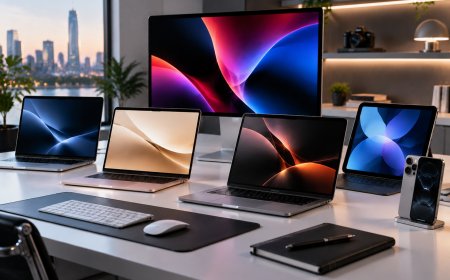
The hardware feels deliberately positioned above traditional low-cost Chromebooks. These are thin, premium laptops with touchscreen displays, modern processors and materials designed to compete more directly with Windows ultrabooks and MacBooks.
The Android Phone Integration Is the Best Reason to Care
Googlebook becomes more distinctive when paired with an Android phone. Rather than simply synchronising notifications, Google has designed the laptop to access phone apps, files and ongoing activities directly.
Google’s cross-device services documentation explains that a compatible Android phone can expose notifications, files, media and activities to the Googlebook. Both devices need to use the same Google Account, and the phone must run Android 17 or newer.
In practice, accessing phone files from the laptop is one of the simplest and most useful features. A screenshot or downloaded document stored on the phone can appear in the laptop’s file environment without manual transfer. Quick Share remains available for more conventional file exchanges with Android devices, Chromebooks and supported Windows PCs.
Phone-app access is similarly convenient. Instead of mirroring the entire phone display, individual mobile apps can appear on the laptop and launch like normal desktop apps. That keeps the phone itself out of the way while still providing access to apps that may not have equivalent desktop software.
Continue Activity Shows What Googlebook Could Become
One of Googlebook’s most interesting ideas is the ability to continue work started on another device. An activity running on a phone can appear on the laptop so the user can pick it up on the larger screen without searching for the same document or page again.
When supported, the experience feels far more natural than emailing yourself a link or manually reopening the same file. This cross-device behaviour makes a phone and laptop feel like parts of one system rather than two independent computers sharing an account.
The limitation is app support. Early use shows that the concept works better with some Google productivity apps than with the Android ecosystem as a whole. That makes Continue Activity an excellent demonstration of what Google wants the platform to become rather than a universal feature that already works everywhere.
This is one of several areas where developer adoption will determine whether Googlebook’s best ideas become everyday conveniences or remain impressive demonstrations limited to a smaller set of apps.
Android Apps Still Need Better Desktop Behaviour
Running Android applications on a laptop is not ne. Still, Google is trying to make it easier to tell which apps work well with a keyboard, mouse, and resizable windows.
The Play Store on Googlebook assigns desktop compatibility categories, from apps built specifically for desktop use to apps that work better through a website. That guidance is useful because opening an app on a laptop doesn’t mean it behaves like true desktop software.
Early use exposes the difference. Some Android apps scale reasonably well but still rely on mobile interaction conventions, while others lack expected keyboard shortcuts, right-click behaviour, or layouts optimised for larger screens. Phone-cast apps can also look softer or less responsive than software running directly on the laptop.
Google cannot solve every one of those problems by changing the operating system. Developers will need to treat Googlebook as a platform worth optimising for, particularly if Google wants Android applications to compete with mature Windows and macOS desktop software.
Gemini Is Built Into the Way Googlebook Works
AI is not an optional add-on here. Google explicitly describes the platform as designed for Gemini Intelligence, and several of its most unusual interface ideas depend on it.
Magic Pointer allows users to invoke Gemini around whatever is currently selected on screen. Google says it can understand text, images and surrounding context, reducing the need to copy information into a separate chatbot window before asking for help.
Rambler approaches input differently. Rather than functioning as basic speech-to-text, it is designed to turn unstructured spoken thoughts into cleaner written material. Google says it can remove verbal filler, organise ideas and format information while supporting multilingual speech.
The company details these features in its Googlebook intelligence overview, which also introduces Create My Widget and Google Antigravity for building lightweight tools and applications.
These features make more sense on a laptop than some of the AI additions appearing across consumer electronics. A computer is already where users write, organise information, research and build software, so contextual assistance has a natural role if it reliably reduces work rather than interrupting it.
The Glowbar Gives the Hardware an Identity, but Not Much Utility Yet
Googlebook manufacturers have adopted a small exterior light strip called the Glowbar as a recognisable visual feature. It can react to Gemini activity and roughly indicate charging or battery status.
It gives otherwise conventional laptop designs a shared Googlebook identity, but its practical usefulness is limited because the light usually faces away from the user while the machine is open.
Google is opening Glowbar access to developers, which could eventually make it more interesting. Notifications, timers, progress indicators or application-specific signals could give the light a reason to exist beyond branding.
For now, it is better understood as a design signature than a feature that should influence a purchasing decision.
Googlebook Still Shows Some ChromeOS and Android Rough Edges
The broader interface still doesn’t feel as polished as the best parts of the phone integration. Window behaviour, menus, and desktop controls can occasionally reveal inconsistencies that make the system feel less mature than Windows or macOS.
Chrome also retains some ChromeOS-style account behaviour. Users can sign in to multiple Google accounts on the computer, but account separation inside the browser doesn’t work the same way as independent Chrome profiles on Windows and macOS.
There are smaller ergonomic issues, too. Certain keyboard-remapping options and desktop interface elements do not always behave as expected, reinforcing the sense that Google is still resolving the differences between Android assumptions and traditional laptop interaction.
None of these problems destroys the basic experience, but they matter on laptops starting at $899. Premium hardware raises expectations for software consistency, particularly when Google is positioning Googlebook as an alternative to established desktop platforms rather than an inexpensive secondary computer.
Android Compatibility Is Broader in Theory Than at Launch
Google says cross-device services support phones running Android 17 or newer, but launch-day compatibility isn’t yet equally complete across every Android manufacturer.
Some of the most advanced continuity features initially work most reliably with Google’s own Pixel devices. Early reporting has identified limitations with Samsung phones, even though those devices run the required Android version, highlighting the difference between an open compatibility requirement and fully implemented manufacturer support.
This is an important weakness because Googlebook’s strongest selling point is its relationship with Android. The platform becomes considerably less differentiated if those features work best only within Google’s Pixel ecosystem.
Google can improve that through software updates. Still, buyers using non-Pixel Android phones should verify support for the specific cross-device features they want rather than assuming every Android 17 phone behaves identically.
Price Changes the Expectations
The entry-level Acer Googlebook starts at $899 with an Intel Core Ultra 5 processor, 16GB of LPDDR5X memory and 512GB of PCIe storage. More expensive models go beyond $1,000, putting the Googlebook directly against well-established premium Windows laptops and MacBooks.
The hardware specifications are competitive. For example, the Acer Googlebook combines a 14-inch 2880 × 1800 OLED touchscreen with a 120Hz refresh rate and an NPU rated at up to 47 TOPS, while the XPS model uses a Snapdragon X Elite and weighs roughly 2.2 pounds.
Google also includes 12 months of Google AI Pro with new systems, alongside other introductory software offers. Googlebook OS is promised regular feature drops and updates for up to 10 years.
Those additions strengthen the package, but Googlebook isn’t competing on price. Buyers are being asked to invest in a new desktop platform while Windows and macOS already offer mature application ecosystems. That makes software refinement and developer support especially important.
Pros and Cons
Pros:
- Android phone integration is significantly deeper than basic notification syncing.
- Direct access to phone files can remove unnecessary transfer steps.
- You can use individual phone apps without mirroring the entire handset.
- Gemini features are integrated into everyday laptop workflows.
- Launch hardware from major PC manufacturers feels appropriately premium.
- 16GB of RAM and 512GB of storage are standard across the initial lineup.
- A long software-support commitment improves the platform’s value.
Cons:
- Android apps remain inconsistent as desktop applications.
- Some cross-device features have limited app or phone support at launch.
- Desktop interface behaviour still needs refinement.
- Chrome retains some account-management limitations associated with ChromeOS.
- Starting at $899, Googlebook competes with mature Windows and macOS alternatives.
Final Verdict
Googlebook’sbiggestt achievement isn’t bringing Android apps to a laptop. Chromebooks have done versions of that for years. The real advance is making an Android phone feel like an active extension of the computer, with files, applications, notifications and ongoing work available without constantly switching devices.
That integration gives Googlebook a clearer identity than a simple premium Chromebook refresh. At the same time, Gemini features such as Magic Pointer and Rambler show how AI can become part of the operating system rather than another standalone application.
The software still needs work. Desktop app quality varies, some continuity features remain limited, and interface quirks make the first release feel younger than the polished hardware surrounding it. At premium-laptop prices, those weaknesses are difficult to ignore.
For Pixel and Android users willing to adopt a new platform early, Googlebook already offers several ideas that Windows and macOS users may reasonably want on their own devices. For everyone else, the first generation is best viewed as an ambitious foundation. Google has finally produced an Android laptop experience with a compelling reason to exist; now it needs the ecosystem and software polish to match the idea.
What's Your Reaction?
 Like
0
Like
0
 Dislike
0
Dislike
0
 Love
0
Love
0
 Funny
0
Funny
0
 Angry
0
Angry
0
 Sad
0
Sad
0
 Wow
0
Wow
0