


































OpenAI Dots: A Powerful AI Agent With Real-World Limits
OpenAI Dots brings always-on AI agents to ChatGPT, using a cloud computer, connected apps, and GPT-6 Astra to handle ongoing tasks.
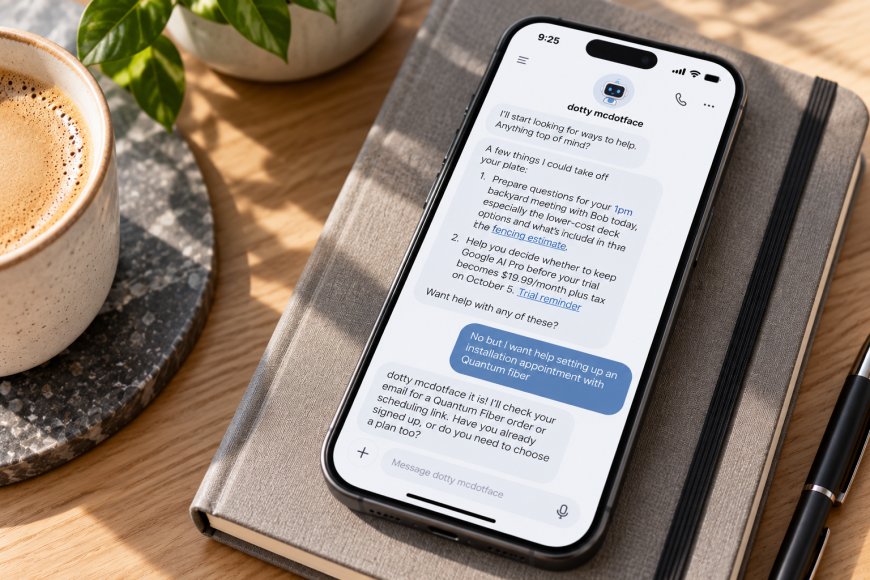
OpenAI Dots is an AI agent designed to take responsibility for ongoing work rather than simply respond to individual prompts. Powered by GPT-6 Astra, a Dot has its own cloud computer and browser, can work with connected applications, retain context and continue tasks between conversations.
OpenAI describes Dots as always-on agents that can take a goal, work through multiple steps and return to the user when a decision requires human judgment. OpenAI’s Dots documentation outlines the core capabilities and controls available to users.
What Makes Dots Different
A Dot is built around longer-running tasks rather than a single exchange. Users can define what they want the agent to accomplish and specify what it can do independently.
OpenAI says Dots can handle complex problems, work with connected tools, perform recurring work and follow up across conversations. That gives the system a broader role than an assistant that only responds when prompted.
The Cloud Computer Is Central to Dots
Each Dot has access to its own cloud computer and browser. This allows the agent to interact with websites and applications within that environment instead of being limited to generating text.
OpenAI also provides an option for local computer access. When enabled, a Dot can work with files and applications on the user’s computer, although that access is controlled separately and is not automatically granted. OpenAI’s workspace controls explain how it manages cloud and local computer permissions.
This separation matters because users can decide how much access an agent receives. A workflow that only requires web-based work can stay in the cloud, while other tasks may require access to a local computer.
Connected Apps Extend the Workflow
Dots can work with supported connected applications, allowing information from services such as Slack and other workplace tools to become part of an ongoing task.
OpenAI’s connected-app documentation explains that available capabilities depend on the individual service, account, plan, region and workspace permissions. Some apps provide information that ChatGPT can reference, while others support specific actions.
This makes connected applications an important part of the Dot model. The agent’s usefulness depends not only on its underlying model but also on the information and actions available through the services a user connects.
Dots Can Handle Recurring Work
OpenAI says Dots can handle recurring work and continue making progress between conversations. Users can give an agent an ongoing responsibility rather than repeatedly starting the same task from scratch.
That can include scheduled work and follow-ups where the task supports those capabilities. The official Dots guide explains how users define goals, configure permissions and manage ongoing work.
The distinction is important because persistence is one of the central ideas behind Dots. The agent is intended to maintain context around an ongoing responsibility instead of treating every interaction as an isolated request.
GPT-6 Astra Provides the Model Behind Dots
Dots are powered by GPT-6 Astra, OpenAI’s model for complex reasoning, coding, research, computer use and professional work. OpenAI’s GPT-6 Astra overview describes computer-use capabilities that include interacting with websites, working with software and handling multistep tasks.
Astra’s role is important because Dots need more than text generation. The agent has to interpret instructions, determine the next action and operate tools within the permissions provided by the user.
OpenAI also says Astra is designed to ask for input when a decision could materially change the result. That keeps some consequential decisions with the user rather than treating every action as something the agent should complete automatically.
Permissions Matter More With an Agent
Because Dots can interact with external services and computers, permissions are central to the product. Users and workspace administrators can control whether Dots can access connected applications, cloud computers and local computers.
OpenAI says enabling Dots does not automatically give an agent access to every application or website. Existing app authorisations and workspace permissions still determine what it can access and which actions it can perform.
Workspace administrators can also configure rules around Dot behaviour.OpenAI’s administration documentation describes controls for cloud computer use, browser access, connected apps, local computer access and custom rules.
What Dots Can and Cannot Do
The available documentation supports a broad set of capabilities, including computer use, browsing, connected-app workflows and recurring tasks. However, those capabilities are conditional on the tools, permissions and services available to the particular Dot.
A cloud computer does not automatically provide access to a user’s existing accounts or local environment. OpenAI notes that a DDot’s cloud computer does not inherit a user’s local VPN, browser sign-ins, or device policies, and some websites may still require the user to sign in within the cloud environment.
That means autonomy is not unlimited. The agent can work independently within the environment and with the permissions it has been given. However, account access, security controls and approval requirements can still determine how much of a workflow it can complete on its own.
Availability and Pricing
Dots are being rolled out to eligible Pro and Business Premium users, while Enterprise access is available as a beta controlled by workspace administrators. OpenAI says Pro availability excludes the European Economic Area, Switzerland and the United Kingdom at launch.
ChatGPT Pro currently starts at $100 per month, according to OpenAI’s current Pro plan information. The cost is therefore an important consideration for users evaluating Dots specifically for ongoing professional work.
OpenAI’s availability information may change as the rollout expands, so users should check access against their account and region rather than assume it from the general product announcement.
What to Consider Before Using Dots
The main consideration is access. A Dot becomes more useful when the services, files, and computer environments required for a task can connect safely and appropriately. Without those permissions, its ability to complete an end-to-end workflow is naturally more limited.
The second consideration is oversight. OpenAI’s controls are designed to give users authority over permissions and consequential actions. That makes Dots better suited to workflows where users can define boundaries and review important results rather than treating the agent as an unrestricted replacement for human decision-making.
The final consideration is cost and availability. Dots are still being rolled out across plans and regions, while the Pro tier that provides access costs $100 per month. For users who only need occasional AI assistance, the additional agent capabilities may not be necessary.
Final Verdict
OpenAI Dots extend ChatGPT into a more persistent agent model, combining GPT-6 Astra with a cloud computer, connected applications, memory and recurring work. The defining feature is not simply the model but the environment in which the agent can operate.
The system is best suited to tasks that require multiple steps and ongoing context. At the same time, permissions, account access, security controls and human approvals remain important parts of the workflow.
Dots therefore represent a more autonomous way to use ChatGPT, but their practical value depends on the tasks, tools and level of access a user is prepared to provide.
What's Your Reaction?
 Like
0
Like
0
 Dislike
0
Dislike
0
 Love
0
Love
0
 Funny
0
Funny
0
 Angry
0
Angry
0
 Sad
0
Sad
0
 Wow
0
Wow
0