If your main goal is to own a tablet for marking up, highlighting, and annotating e-books or documents — with occasional note-taking or sketching — Amazon’s new Kindle Scribe Colorsoft may be worth the significant price tag. For most other users, however, it will be difficult to justify paying $630 or more for an 11-inch e-ink tablet with a colour display that is writable.
That said, if you were already considering the 11-inch $549.99 Kindle Scribe — which offers a paper-like writing experience but lacks colour — it arguably makes sense to spend a bit more and opt for the Colorsoft model, which starts at $629.99.
At these prices, both the Kindle Scribe and the Scribe Colorsoft fall into what many would consider unnecessary luxury territory, especially when compared with Amazon’s far more affordable standard Kindle at $110 or the Kindle Paperwhite at $160.
Announced in December, the Fig colour version began shipping on January 28, 2026, and is currently priced at $679.99 with 64GB of storage. Amazon is seeking to establish a niche in the tablet market with these upgraded Kindle devices, positioning them closer to premium e-ink tablets such as reMarkable rather than traditional Kindles. Still, high-end e-ink readers equipped with pens are unlikely to attract a massive audience. By contrast, many consumers can justify the cost of an iPad thanks to its broad functionality, including video streaming, drawing, writing, productivity tools, and access to thousands of native apps and games.
The Kindle Scribe Colorsoft, by comparison, is aimed at a specific reader or professional. It’s well-suited for students, researchers, and others who regularly annotate documents or mark up files.
People who enjoy maintaining to-do lists or journaling may also find value in the device, though it would need consistent daily use to make the price worthwhile.
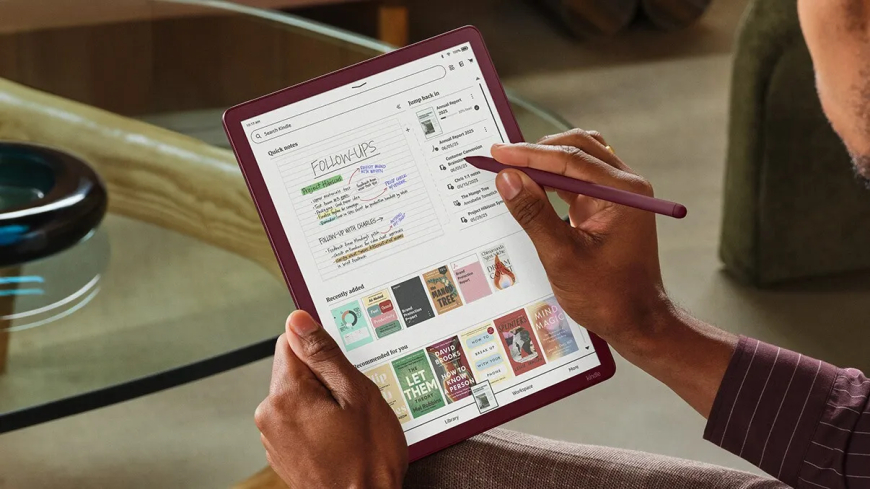
Using the device is intuitive. Its Home screen closely resembles other Kindles, offering quick access to your notes and library, along with suggestions for write-enabled books such as Sudoku, crossword puzzles, and drawing guides. Book covers and recommendations appear in colour, making it easier to scan your library at a glance.
In terms of performance, Amazon says this 2025 model is 40% fasterforo page turns and writing responsiveness. In practice, the device feels responsive, with smooth page turns and fluid handwriting.
Despite its large display, the tablet remains thin and lightweight, measuring 5.4 mm (0.21 inches) thick and weighing 400 g (0.88 pounds). It’s noticeably easier to carry than an iPad or similar tablet, though an iPad mini with an 8.3-inch display is slightly lighter. As long as your bag fits an 11-inch screen, carrying the Kindle Scribe is manageable. Compared with earlier Colorsoft devices, the uniform bezel around the display is a welcome improvement.
The Kindle Scribe Colorsoft uses a glare-free, oxide-based e-ink display with a textured surface that closely mimics the feel of writing on paper. This makes the transition from analogue note-taking easier and helps conserve battery life, with Amazon estimating up to eight weeks of use between charges.
The display automatically adjusts brightness based on ambient lighting, and users can increase warmth for nighttime reading. That said, as a touchscreen, it isn’t as responsive as LCD or OLED displays found on iPads. Gestures such as pinching to resize text are slightly delayed.
As expected, the Kindle Scribe Colorsoft supports reading e-books and PDFs, as well as importing Word documents and other files from Google Drive and Microsoft OneDrive, or via the Send to Kindle feature. Supported formats include PDF, DOC/DOCX, TXT, RTF, HTM, HTML, PNG, GIF, JPG/JPEG, BMP, and EPUB. Notebooks created on the device can also be exported to Microsoft OneNote.
The included Premium Pen has its pros and cons. Unlike the Apple Pencil, it doesn’t require charging, which is convenient. It’s designed to replicate the sensation of writing on paper and glides smoothly across the display. However, the rounded design lacks a flat edge, making it feel less secure in the hand compared with Apple’s stylus and slightly easier to drop.
Amazon’s pen tips also wear down over time and need replacing. While a pack of 10 replacement tips costs around $17, it’s still another accessory users need to manage.
The device offers 10 pen colours and 5 highlighter colours, enabling colourful annotations. Users can write with a pen, fountain pen, marker, or pencil, each with adjustable stroke widths. You can assign a favourite tool as a shortcut via the pen’s side button — set to highlighting by default — and turn it offif accidental presses become an issue.
Overall, the writing experience feels natural. While the e-incolours are muted, which may not appeal to everyone, the display works well for writing, note-taking, and highlighting. It’s not ideal for digital art, even with the new shader tool, but it performs well for its intended tasks.
From the Home screen, users can jump straight into Quick Notes or organise their writing by creating Notebooks from the Workspace tab. Notebooks offer a wide range of templates, including blank, ruled, meeting notes, storyboards, habit trackers, planners, music sheets, graph paper, checklists, and dotted layouts. New templates include Meeting Notes, Cornell Notes, Legal Pad, and College Rule.
Erasing feels satisfyingly familiar — flip the pen over to use the soft eraser, much like a traditional pencil. A precision eraser with adjustable widths is also available. Occasionally, faint ghosting appears after erasing, a known quirk of e-ink displays, though it fades over time.
A Lasso tool allows users to select, move, resize, or copy handwritten content, though casual note-takers may not rely on it often.
There are additional annotation features worth noting. When writing in books or Word documents, Active Canvas creates space for notes by shifting surrounding text. Notes stay anchored even if the font size changes. In documents with expandable margins, users can write notes in the margins instead of directly on the page.
A Kindle with AI — naturally
The Kindle Scribe Colorsoft also introduces several AI-powered features.
The device can clean up messy handwriting and automatically straighten highlights and underlines. On occasion, highlighting caused the review unit to freeze, though it recovered after returning to the Home screen.
A new AI tool, marked by a sparkle icon, allows users to summarise text or refine handwriting. While it doesn’t convert handwriting into typed text, it offers a selection of handwritten fonts — Cadia, Florio, Sunroom, and Notewright — via the Customise menu.
The AI isn’t flawless. It handled messy handwriting reasonably well but struggled when multiple scribbles appeared close together. Still, it’s useful for users who prefer writing by hand but want more legible notes.
An AI-powered search feature scans across notebooks to locate notes or identify connections. Searches can be typed or handwritten, with handwriting converted into text. Results can be explored further using the Ask Notebooks AI tool, which lets users query their notes conversationally.
Amazon plans to roll out additional AI features, including “Ask This Book,” which provides spoiler-free answers to questions about highlighted passages, and “Story So Far,” designed to help readers catch up on a book after a break.
The Kindle Scribe Colorsoft is available in Graphite (Black) with either 32GB or 64GB of storage for $629.99 and $679.99, respectively. The Fig colour option is available only in the 64GB configuration for $679.99. Protective cases are sold separately for $139.99.
































 Like
0
Like
0
 Dislike
0
Dislike
0
 Love
0
Love
0
 Funny
0
Funny
0
 Angry
0
Angry
0
 Sad
0
Sad
0
 Wow
0
Wow
0