






































WordPress launches browser-based private workspace through new service my.WordPress.net
WordPress introduces my.WordPress.net, a browser-based private workspace that lets developers run and test WordPress environments instantly without installing local software.

WordPress’s publishing software can now run fully inside a web browser, the organisation behind the open source publishing platform announced on Wednesday. With a new service called my.WordPress.net, users can create a site and start publishing without signing up, choosing a hosting plan, or registering a domain name. Instead, the new offering uses the same technology that powers WordPress demos and turns it into a lasting, personal publishing environment.
There is one major limitation to using WordPress in this way: sites created on my.WordPress.net are private by default and cannot be accessed through the public internet.
“They aren’t optimised for traffic, discovery, or presentation, and they don’t need to be,” a blog post announcing the new service said. “Instead, WordPress becomes a personal environment where ideas can exist before they are ready to be shared, or where they may never be shared at all.”
Sites created through the service are tied to the user’s web browser, with all site data stored directly in the browser’s storage. That means the site cannot be opened from another device. However, users can move their site to a dedicated WordPress host later if they decide they want to make it public.
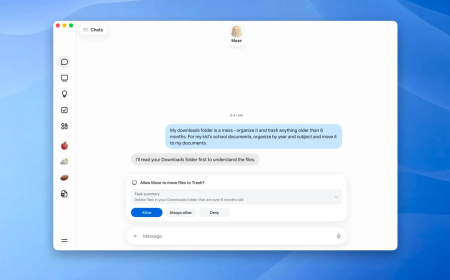
This gives WordPress a new role as a personal workspace for activities such as private writing, journaling, drafting, research, learning, or building tools for individual use. For that last use case, my.WordPress.net includes an App Catalogue that offers a range of tools created with WordPress plug-ins, including a Personal CRM, Personal RSS Reader, bookmarking tool, AI Workspace, and more.
The post explains that WordPress Playground powers my.WordPress.net, the open-source project that lets you install WordPress on any device with one click and integrates with OpenAI and CLI apps to build new tools. Because of that, users can work with an AI assistant to modify my.WordPress.net for tasks such as adjusting a plug-in or creating a completely new one.
Users can also ask the assistant about information stored inside WordPress, which it can remember, allowing WordPress to function as a personal knowledge base that AI can access.
The post notes that the service may take longer to start on first use and recommends saving backups regularly. Storage starts at around 100M B, making the service better suited for storing small personal apps and lightweight use cases.
If users want to erase their current work at any point, they can press a button to reset the site. They can also create new temporary instances that automatically reset when the browser is refreshed.
The new service arrives after WordPress formed an AI team last year to launch new AI products for the developer community. The commercial hosting platform WordPress.com also introduced an AI website builder last year, allowing users to create a site via a chatbot-style interface.
What's Your Reaction?
 Like
0
Like
0
 Dislike
0
Dislike
0
 Love
0
Love
0
 Funny
0
Funny
0
 Angry
0
Angry
0
 Sad
0
Sad
0
 Wow
0
Wow
0