






















I Used Every Major iPad Generation
I used nearly every major iPad generation, from the original 2010 model to Apple-silicon iPad Pros, to see which upgrades actually transformed Apple’s tablet and when the iPad truly became great.
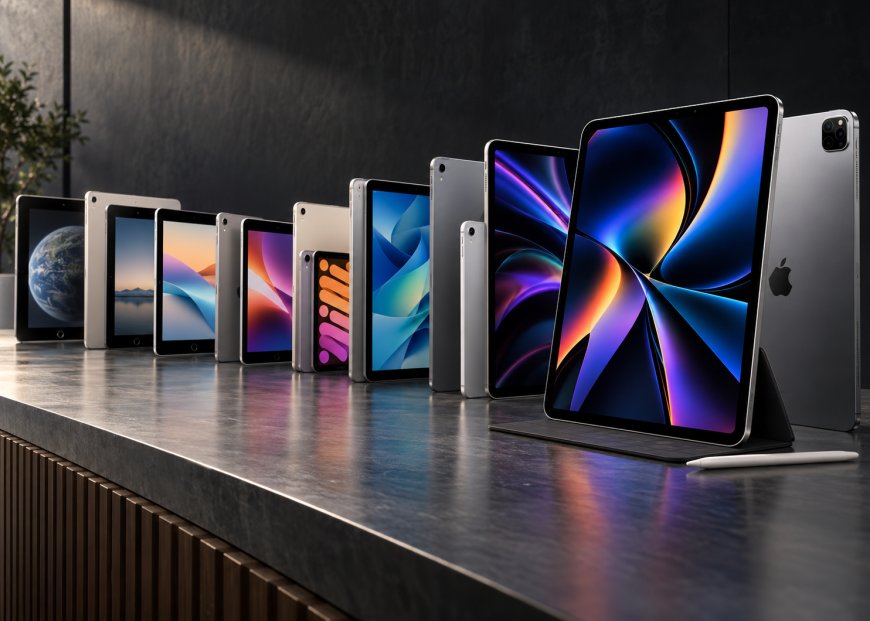
I Used Every Major iPad Generation.
I went back through almost the entire history of the iPad because I wanted to answer a question that specifications alone cannot really answer: when did Apple’s tablet actually become great? Apple’s current iPad lineup stretches from the standard iPad and iPad mini to the iPad Air and iPad Pro, making the category look mature and carefully segmented. Revisiting the older generations reminded me that Apple spent years experimenting with size, weight, displays, accessories, and even the basic question of whether an iPad should behave more like a phone or a computer.
The first iPad arrived in 2010, while the modern lineup now includes machines with laptop-class Apple silicon, OLED displays, Pencil support and keyboard accessories. What surprised me most as I moved through the generations was that the upgrades I noticed most were rarely the biggest processor jumps. Weight, screen quality, charging, accessory support, and how iPadOS handles work often changed the experience more than another round of CPU performance ever did.
The Original iPad Still Makes Sense.
The first iPad is obviously ancient by 2026 standards, but I was surprised by how understandable it still feels. It is thick, heavy and extremely limited compared with anything Apple sells today, yet the basic experience of picking it up, touching what I want and rotating it between portrait and landscape is already completely recognisable.
That was the original iPad’s real achievement. Apple did not build a Windows laptop without a keyboard and ask people to operate a desktop interface with a stylus; it scaled up the interaction model people had already learned from the iPhone and made the entire tablet feel approachable.
Apple launched the original iPad at $499, which also made the product easier to take seriously at a time when tablets had a poor reputation. I would not use one for any real work today, but after spending time with it again, I completely understand why millions of people immediately saw a reason to own one.
The iPad 2 Was the First Version That Felt Finished.
With the iPad 2, I started thinking less about the product’s historical importance and more about whether I could actually enjoy using it. Apple made it dramatically thinner and lighter, increased performance and added front and rear cameras while keeping the same $499 starting price.
Those changes sound routine now, but together they made the second-generation model feel much more like the product Apple had originally wanted to build. The first iPad proved the category could work, while the iPad 2 removed enough bulk and rough edges that the hardware stopped feeling experimental.
I also understand why Apple kept selling the iPad 2 for so long. Nothing was fundamentally wrong with its formula, and later generations often improved one or two areas without making the whole experience feel as different as the jump from the first model to the second.
Retina Made the Third iPad Beautiful, but the Rest Felt Transitional.
The third-generation iPad gave me one of the first upgrades in the series that I could appreciate immediately without checking specifications. Moving from the older display to the Retina panel makes text cleaner, icons sharper, and photographs dramatically better. The difference still looks impressive when you place the two generations side by side.
The problem is that the rest of the device does not feel nearly as transformative. It became heavier again, the performance improvement was modest, and Apple made the strange decision to market it simply as “the new iPad,” a name that becomes absurd the moment another new model arrives.
Apple then replaced it with the fourth-generation iPad only months later, adding a much faster A6X chip and switching to Lightning. If I had bought the third-generation model shortly before that refresh, I would have been annoyed, because the Retina screen was excellent but the overall product now feels like a short bridge between two more complete generations.
The Original iPad Mini Reminded Me That Specs Are Not Everything.
The first iPad mini is not particularly impressive on paper. Internally, it borrowed heavily from the iPad 2 rather than using Apple’s most advanced tablet hardware, and at $329, it wasn’t exactly a cheap impulse purchase.
Then I picked it up, and the decision suddenly made much more sense. The smaller body is significantly easier to carry, easier to hold for reading and much more comfortable when I am standing or using the tablet with one hand.
That is one of the clearest lessons I took from going through the entire iPad lineup. Apple didn’t need to make the mini the fastest iPad because portability was the feature, and for many people, that mattered more than having the most advanced processor available.
The mini also proved that there was no single ideal tablet size. Some buyers wanted a screen approaching laptop dimensions, while others wanted something only slightly larger than a phone, and Apple eventually built an entire iPad family around those different priorities.
iPad Air Was the First Redesign I Really Loved
The original iPad Air remains one of my favourite changes Apple made to the full-size tablet. Apple significantly reduced its weight, narrowed the side bezels and moved to the A7 chip, creating a device that looked familiar but felt completely different the moment I picked it up.
The weight reduction matters more than the specification sheet suggests. Older full-size iPads constantly remind me I am holding a large slab of glass and aluminium, while the Air begins to disappear in your hands in a way the earlier models never did
The branding also worked unusually well. Calling it “Air” immediately communicated what had changed, unlike some of Apple’s confusing earlier naming, and the product genuinely felt thinner, lighter and more modern rather than simply being another annual update.
This generation also arrived as Apple transitioned to the flatter visual design of iOS 7. I still prefer some of the older interface’s personality, but the combination of lighter hardware and lighter-looking software made the Air feel distinctly new.
The First iPad Pro Raised a Question Apple StillHasn’tt Fully Answered.
The 12.9-inch iPad Pro from 2015 marked a major shift in Apple’s tablet strategy. The enormous display, A9X processor, four-speaker system, and Apple Pencil support pushed the device into territory that felt much closer to a professional computer than a larger iPad.
I understand the appeal immediately when I use it for drawing, media or anything that benefits from the screen size. The Apple Pencil also makes more sense than the styluses Steve Jobs used to criticise because it isn’t required to operate the interface; it is a precision accessory for people who actually need it.
The problem appears the moment I add a keyboard and start treating the device like a laptop. At that point, I inevitably ask why I wouldn’t just use a MacBook, especially when the iPad still has software limitations that become more obvious the harder I push it.
That question has followed the iPad Pro ever since. Apple keeps making the hardware more capable, but each increase in capability makes it harder to avoid comparing it to the Mac.
The 2018 iPad Pro Was the Real Design Turning Point.
The 2018 iPad Pro is the first older model I can place next to a current iPad without it immediately looking dated. Apple removed the Home button, introduced Face ID, reduced and equalised the bezels, and replaced Lightning with USB-C, changing both the device’s appearance and how I could actually use it.
USB-C mattered because it made the iPad feel less isolated from the rest of my technology. External storage, displays, cameras and other accessories suddenly became much easier to connect without relying on the strange collection of adapters that had accumulated around Lightning.
Apple also fixed one of the most awkward parts of the original Apple Pencil. Instead of charging the Pencil by sticking it directly out of the bottom of the iPad, the newer version attaches magnetically to the side. It charges there, which feels like the design Apple should have shipped from the beginning.
The overall hardware finally matched the professional image Apple had been pushing. My main frustration was that the software still hadn’t caught up with what the device appeared capable of.
iPadOS Was Necessary, but the Hardware Kept Moving Faster
Separating iPadOS from the iPhone’s software was one of Apple’s most important decisions. The iPad had become too powerful to keep behaving like an enlarged phone, and features such as desktop-class browsing and better file handling were needed.
That tension became impossible to ignore once Apple started using M-series chips. At that point, I was no longer wondering whether the iPad had enough computing power; I was wondering whether iPadOS could use it enough.
The M1 iPad Pro Had More Power Than I Knew What to Do With
Putting the M1 into the iPad Pro in 2022021 felt enormous because Apple was now using the same silicon family that had transformed the Mac. The 12.9-inch model also got the mini-LED Liquid Retina XDR display, while high-end configurations offered up to 16GB of unified memory and 2TB of storage.
The hardware was extremely impressive, but I struggled to find ordinary situations where I genuinely needed all of that performance. Browsing, video playback, and M1 apps still run on apps rather than full desktop software.
That does not mean the M1 was pointless. Creative applications, high-resolution editing and more demanding workflows benefited from the extra headroom, but for a large number of buyers, the processor was capable of far more than their
What's Your Reaction?
 Like
0
Like
0
 Dislike
0
Dislike
0
 Love
0
Love
0
 Funny
0
Funny
0
 Angry
0
Angry
0
 Sad
0
Sad
0
 Wow
0
Wow
0