























Google AI Smart Glasses Are Closer Than Ever to Everyday Use
A hands-on look at Google’s latest AI-powered smart glasses reveals improved real-time assistance, visual recognition, and natural interactions. Discover the features, benefits, limitations, and what’s next for wearable AI technology.
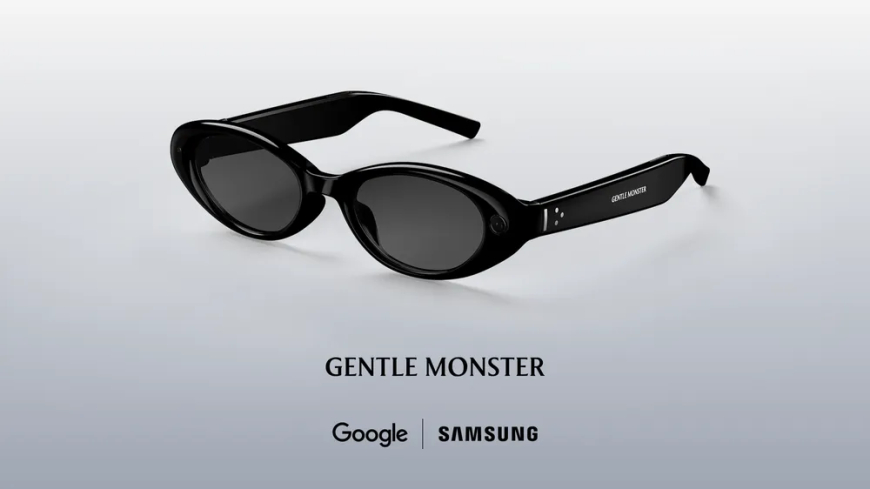
At this year’s Google I/O developer conference, Google offered a closer look at its upcoming AI-powered smart glasses, allowing attendees to briefly test a prototype version of the company’s Android XR eyewear. Unlike the audio-only glasses expected to launch later this year, these next-generation glasses combine both audio and visual experiences, bringing digital information directly into the user’s field of view.
Originally introduced at Google I/O last year, the Android XR glasses feature an in-lens display that overlays information onto the real world. Users can view items such as weather updates, navigation directions, ride-hailing information, live translations, and AI-generated widgets without constantly checking a smartphone. Google says users will even be able to create customised widgets using artificial intelligence.
The company also confirmed that both the audio-only version and the future display-equipped glasses will work with Android and iOS devices, expanding compatibility beyond Google’s own ecosystem.
Google views the display-enabled glasses as the next stage of its wearable AI strategy. The products are being developed in partnership with Warby Parker, Gentle Monster, and Samsung, combining Google’s software and AI capabilities with established eyewear design expertise.
The version demonstrated during the event remained a prototype rather than a finished consumer product. Google representatives explained that the current design allows engineers to focus on display technology, performance, and battery life without being constrained by final styling decisions. As a result, the prototype differs significantly from what eventual commercial versions may look like in terms of shape, dimensions, and overall aesthetics.
Some features planned for future consumer models were absent from the prototype. For example, the shipping version will be able to detect when the glasses are worn or removed, a functionality that was not available in the test unit.
To activate Google’s Gemini AI assistant, users press and hold a section on the right side of the frame for approximately two seconds. An audio signal indicates that Gemini is active and listening. In the prototype, launching Gemini automatically activated the onboard camera as well, although Google says future versions will allow users to choose whether the camera starts alongside the assistant.
One demonstration involved using Gemini to play music through the glasses. While the crowded event environment made detailed audio evaluation difficult, the glasses successfully handled music playback through built-in speakers. Although the sound experience may not replace premium earbuds, it offers the advantage of allowing users to remain aware of surrounding conversations and environmental sounds while listening.
Controlling playback is straightforward. Users can stop music by tapping the side of the frame, eliminating the need to interact directly with their phones.
The glasses also support image capture. During testing, users pressed a dedicated photo button to capture images, which were then transferred to connected phones and smartwatches. Future versions will support video recording via a long-press gesture, though that functionality was not enabled on the prototype hardware.
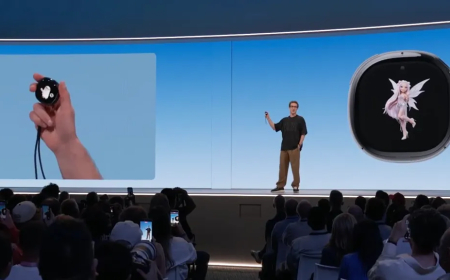
Users can also request photos using voice commands through Gemini. Beyond simple photography, Google demonstrated AI-powered image editing capabilities. For example, users can ask Gemini to capture a photo and transform the subject into an anime-style character. Google’s AI infrastructure processes the image before returning it to the user as an edited version.
During the demonstration, heavy network traffic at the conference venue resulted in processing times of roughly 45 seconds, though performance may vary under normal conditions.
When the display feature is active, users see a simplified home screen floating within their field of view. The prototype included widgets displaying weather information and a countdown timer for the conference. Users can also configure quick-launch shortcuts for frequently used applications such as Google Maps and Google Translate.
The prototype relied on a single display positioned in front of the right eye, although Google says the Android XR platform supports single-display, dual-display, and audio-only configurations. Visual clarity varied depending on the user’s prescription and vision correction setup, but the technology successfully demonstrated how digital information can be layered onto everyday environments.
One of the most impressive demonstrations involved real-time language translation. Powered by the Google Translate app running on a connected phone, the system automatically detected spoken Spanish. It displayed English translations on the glasses while simultaneously delivering spoken English through the speakers. The feature showcased the potential of wearable AI for travel and cross-language communication.
Google noted that translation functionality will also be available on the audio-only glasses, though users without displays would view transcriptions on their smartphones rather than directly through the eyewear.
Navigation is another major use case. Users can ask Gemini for directions to a destination, including broad requests such as finding the nearest coffee shop. Once Google Maps is activated, turn-by-turn directions appear within the user’s field of view. Looking straight ahead reveals upcoming navigation instructions, while glancing downward displays map information and positioning details similar to the familiar blue location dot on smartphones.
Because the experience is connected to Google Maps, saved locations such as home and work automatically carry over to the glasses, simplifying navigation setup.
The glasses can also identify objects and answer questions about what users are seeing. During demonstrations, Gemini successfully recognised plants and interpreted information from books. Although there were occasional delays in identifying artwork, the overall experience highlighted how AI-powered visual search can be integrated directly into wearable devices without requiring users to pull out a phone.
Google acknowledged that many of these capabilities are already available through tools such as Google Lens, but integrating them into smart glasses offers a more seamless and hands-free experience.
The company says additional details about Android XR display glasses will be revealed later this year as its trusted tester program expands. Until then, Google is placing significant emphasis on its upcoming audio-only smart glasses, which are scheduled to arrive sooner.
Like the display-equipped models, the audio-only glasses provide direct access to Gemini AI through speakers embedded in the frame. Users can listen to music, make calls, take photos, interact with smartphone apps, and issue voice commands without reaching for their devices.
Google also previewed how Gemini could interact with third-party applications. One example involved asking the assistant to add ingredients from a recipe directly to a shopping list. Another demonstration showed the glasses analysing food as it was cooked and providing feedback on whether a meal, such as meat on a stove, appeared fully cooked.
With Android XR, Google is making a major push into AI-powered wearables, combining conversational artificial intelligence, augmented information displays, navigation, translation, photography, and contextual assistance into a single device. While the display-equipped glasses are still in development, the latest demonstrations suggest Google is moving steadily closer to turning AI smart glasses into an everyday consumer product.
What's Your Reaction?
 Like
0
Like
0
 Dislike
0
Dislike
0
 Love
0
Love
0
 Funny
0
Funny
0
 Angry
0
Angry
0
 Sad
0
Sad
0
 Wow
0
Wow
0