




























ChatGPT vs Claude vs Gemini: Which AI Assistant Is Best for Each Task?
ChatGPT vs Claude vs Gemini compared for writing, coding, research, images and productivity to find which AI assistant is best for each task in 2026.
Choosing an AI assistant used to be relatively simple. Pick the most capable chatbot available, type a prompt and see what happens.
In 2026, that approach makes less sense.
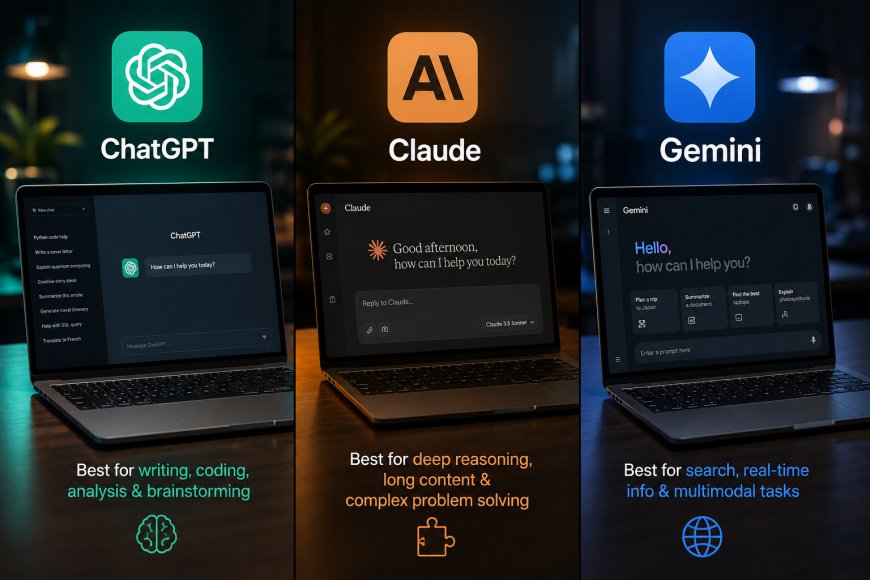
ChatGPT, Claude and Gemini have evolved into broader AI platforms, and their strengths increasingly depend on what you are trying to accomplish. Coding, long-form writing, web research, document analysis, Google Workspace tasks and image-related work can favour different products.
There is also no defensible universal winner. The better question is: Which AI assistant is best for your particular task?
Here is how the three compare.
ChatGPT: The Strongest All-Rounder
ChatGPT’s biggest advantage is breadth.
It can handle everyday questions, writing, research, coding, file analysis, image creation and editing, and longer multi-step workflows without requiring users to move between several separate products.
OpenAI has also expanded ChatGPT beyond ordinary chat. ChatGPT Search can retrieve information from the web, while Codex provides a dedicated coding agent workflow for software development tasks. ChatGPT also supports memory, allowing it to retain useful context when that feature is enabled.
That combination makes ChatGPT particularly attractive to people who do many different kinds of work.
Best ChatGPT Tasks
ChatGPT is particularly useful for:
- general-purpose assistance
- web research and synthesis
- brainstorming
- data analysis
- coding and debugging
- image generation and editing
- working across multiple types of files
- everyday productivity
OpenAI’s current ChatGPT image system can both generate new images and edit existing ones directly through conversation.
That matters because multimodal work increasingly involves moving among text, data, code, and visuals rather than completing a single isolated task.
Where ChatGPT Makes the Most Sense
If someone wants to pay for only one AI product and does not have a highly specialized workflow, ChatGPT is arguably the safest all-purpose choice.
It may not be the automatic winner in every individual category, but its range of capabilities is difficult to ignore.
Best for: Overall versatility
Claude: Excellent for Writing, Coding and Deep Work
Claude has developed a particularly strong reputation around complex knowledge work and software development.
Anthropic describes Claude Sonnet 5 as its most agentic Sonnet model yet, capable of planning, using tools such as browsers and terminals, and operating more autonomously on professional tasks. Its newer Opus 5 model is positioned for demanding coding and knowledge work.
That makes Claude especially interesting when a task requires sustained reasoning rather than a quick answer.
Best Claude Tasks
Claude is particularly well suited to:
- long-form writing
- editing and rewriting
- analyzing lengthy documents
- complex coding
- repository-level software work
- structured business writing
- detailed reasoning
- maintaining tone across long outputs
Its strength becomes especially apparent when a project contains a large amount of context.
Instead of treating every request as an isolated prompt, Claude can be effective when it needs to understand a long document, a substantial codebase, or a complicated set of instructions before producing an answer.
Claude for Coding
Coding is one of Claude’s most important differentiators.
Claude Code gives developers an agentic environment capable of inspecting repositories, modifying files, running commands and working through multi-step development tasks.
Anthropic has continued to make coding and agent behaviour central to its latest models.
For developers dealing with large existing codebases, that can matter more than simple code-generation speed.
Best for: Long-form work and complex coding
Gemini: Best Fit for the Google Ecosystem
Gemini’s greatest advantage is not simply the underlying model.
It is Google.
Gemini can operate across an ecosystem that already includes Search, Gmail, Docs, Drive and other widely used Google services.
Google’s current AI plans explicitly integrate Gemini features into products including Gmail and Google Docs, while paid tiers also bundle cloud storage and additional AI capabilities.
That makes Gemini particularly compelling for users whose work already lives inside Google Workspace.
Best Gemini Tasks
Gemini is especially attractive for:
- Google Workspace productivity
- working with Gmail
- drafting and analyzing Google Docs
- workflows involving Drive content
- search-oriented research
- multimodal tasks
- Google-centric personal productivity
For example, Google says Gemini in Docs can synthesize information from Drive and help create structured documents.
That native connection can be more valuable than a marginal difference in benchmark performance.
Gemini’s Multimodal Advantage
Google has also invested heavily in multimodal AI.
Its premium AI plans combine Gemini with image, video and other generative capabilities, while the Gemini application itself is positioned as a general personal AI assistant.
Users who regularly use Google’s services may therefore find Gemini more convenient than switching between a standalone chatbot and their productivity software.
Best for: Google Workspace and Google-centric workflows
ChatGPT vs Claude vs Gemini for Writing
Writing is one of the hardest categories to declare objectively because quality depends heavily on style.
Claude is often particularly strong when the goal is restrained, structured long-form prose.
It handles detailed tone instructions well and can be effective for reports, essays, business documents and substantial editing jobs.
ChatGPT is more versatile when writing is part of a larger workflow involving research, data, images or other tools.
Gemini becomes more compelling when the writing process occurs primarily in Google Docs or relies heavily on material stored in Drive.
Best for pure long-form writing: Claude
Best for writing plus broader workflows: ChatGPT
Best for Google Docs workflows: Gemini
ChatGPT vs Claude vs Gemini for Coding
The coding comparison has become much closer.
Claude has Claude Code and models explicitly optimized for demanding coding and agentic professional work.
OpenAI has Codex, which can take on coding tasks as an agent rather than functioning only as a conversational code generator. Codex access is incorporated into multiple ChatGPT plans.
Gemini also plays a significant role in developer workflows, particularly through Google’s broader developer and cloud ecosystem.
For complicated existing repositories, Claude is a particularly strong option.
For users who want to code alongside research, analysis, and other everyday AI tasks, ChatGPT offers a broader environment.
Best for complex codebase work: Claude
Best coding/general-purpose combination: ChatGPT
Which Is Best for Research?
This category depends on what “research” means.
For current web research, the ability to find information is only the first step. The assistant also needs to compare sources, distinguish reporting from primary evidence, and synthesize the material accurately.
ChatGPT includes integrated web search and can return cited web information.
Gemini has the obvious advantage of being part of Google, whose ecosystem includes Search and vast amounts of productivity data.
Claude is especially useful after the information has been collected, particularly when the job involves interpreting large quantities of text or producing a structured analysis.
A useful distinction is therefore:
Web research and synthesis: ChatGPT
Google-centred information workflows: Gemini
Deep analysis of supplied material: Claude
Which Is Best for Images?
ChatGPT has a major advantage when image creation and editing need to happen directly within the same conversational workflow.
OpenAI supports generating new images and editing existing ones in ChatGPT.
Google also has substantial image and video generation capabilities distributed across its AI products and plans.
Claude is less centred on consumer image generation and therefore would not be the first choice if producing visual assets is the primary requirement.
Best for conversational image creation and editing: ChatGPT
Which Is Best for Students?
There is no universal student winner.
ChatGPT works well as a broad study assistant because the same environment can be used for explanations, research, writing assistance and file analysis.
Claude is compelling for reading and discussing lengthy academic material and has dedicated educational initiatives. Anthropic has introduced Claude offerings specifically aimed at education and teachers.
Gemini is particularly convenient for students already using Google Docs, Drive and other Google products.
The deciding factor may therefore be thestudent’ss workflow rather than raw model performance.
Which Is Best for Business?
Businesses should look beyond which chatbot produces the nicest response.
The important questions include integrations, data handling, administrative controls, coding capabilities and how well an assistant fits existing company software.
Claude is increasingly targeting professional and specialized workflows, including finance-oriented agents and integrations.
Gemini has a natural advantage for companies built around Google Workspace.
ChatGPT offers the broadest general-purpose proposition for organizations that need a single AI environment to cover many different types of work.
There is no automatic business winner.
The Quick Verdict
| Task | Best Choice | Why |
|---|---|---|
| Overall AI assistant | ChatGPT | Broadest all-purpose workflow |
| Long-form writing | Claude | Strong structured, sustained writing |
| Complex coding | Claude | Strong agentic and repository workflows |
| General coding | ChatGPT / Claude | Both have mature coding-agent ecosystems |
| Web research | ChatGPT | Integrated search synthesis |
| Long-document analysis | Claude | Strong fit for deep contextual work |
| Google Workspace | Gemini | Native Google ecosystem integration |
| Image creation/editing | ChatGPT | Integrated conversational image tools |
| Google Docs workflows | Gemini | Direct Workspace integration |
| General productivity | ChatGPT | Broad mix of tools and capabilities |
These recommendations are editorial judgments based on the products’ current capabilities, rather than a controlled benchmark that claims one underlying model universally outperforms another.
Which AI Assistant Should You Choose?
The answer becomes easier once you stop trying to find one universal winner.
Choose ChatGPT when you want a versatile AI environment that can move between research, writing, coding, analysis and visual work.
Choose Claude when much of your work involves long documents, careful writing, difficult coding or sustained reasoning.
Choose Gemini when Gmail, Google Docs, Drive and the broader Google ecosystem already form the centre of your workflow.
For many professionals, the most productive setup may eventually involve more than one.
The AI market is increasingly separating into specialized workflows rather than producing a single assistant that dominates every category.
That is the important change in 2026.
The question is no longer simply whether ChatGPT, Claude or Gemini is the “best AI.”
It is which one is best for the job you need to do right now.
Tags:
What's Your Reaction?
Like
0
Dislike
0
Love
0
Funny
0
Angry
0
Sad
0
Wow
0