

























OpenAI Adds Virtual Try-On and Favourites to ChatGPT Shopping
OpenAI adds virtual try-on and Favourites to ChatGPT shopping, letting users preview clothing and accessories and save products for later.
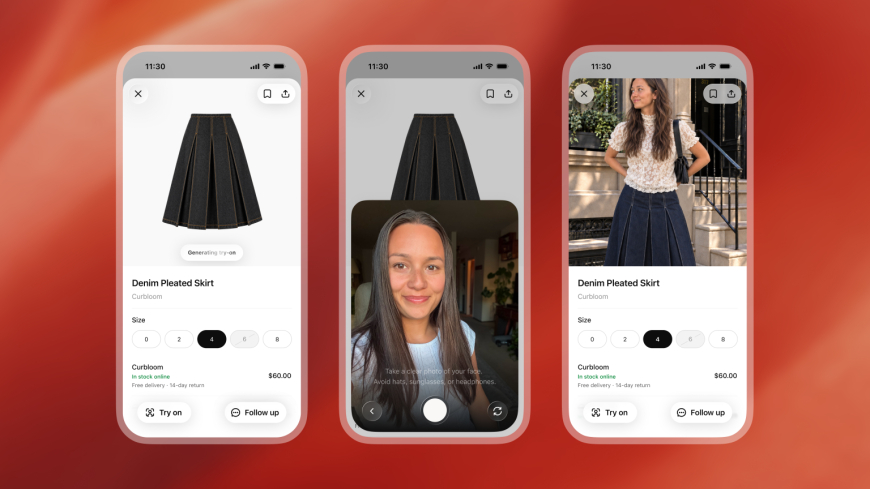
OpenAI is expanding ChatGPT’s role in online shopping with two new features: virtual try-on for clothing and accessories, and a Favourites option to save products for later.
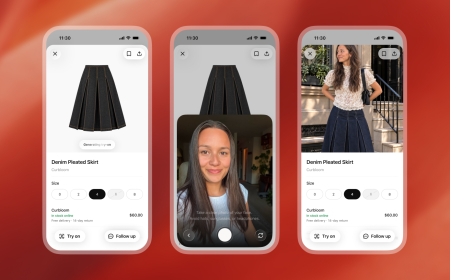
The virtual try-on feature lets users upload a selfie or full-body photo and generate an image showing how a selected item might look on them. A new Try On button will appear alongside eligible clothing and accessory listings in ChatGPT shopping results.
Users can also upload an image of an item, such as a screenshot from the web, and ask ChatGPT to visualise them wearing it.
ChatGPT Images powers virtual try-on
OpenAI says the feature uses its newly introduced ChatGPT Images 2.5 model, which the company says improves lighting, texture quality, instruction following and image-generation speed.
The generated try-on images are meant to help users visualise clothing and accessories, not guarantee fit or sizing. The feature extends ChatGPT’s existing shopping tools, which can already help users search for products, compare options and refine recommendations conversationally.
Favourites adds a way to save products
The second new feature lets users save products to Favourites in their ChatGPT Library. Saved items can be revisited later alongside images created through virtual try-on.
OpenAI also envisions using ChatGPT for broader fashion discovery. Users can describe a style they want to create and ask the assistant to find suitable pieces, or upload an outfit image and search for similar products that are available to buy.
These additions place ChatGPT more directly in visual product discovery, an area where platforms including Google and Pinterest have already built tools for fashion inspiration and shopping.
OpenAI is launching the new shopping features globally, giving ChatGPT users another way to move from product discovery to visual evaluation without leaving the conversation.
What's Your Reaction?
 Like
0
Like
0
 Dislike
0
Dislike
0
 Love
0
Love
0
 Funny
0
Funny
0
 Angry
0
Angry
0
 Sad
0
Sad
0
 Wow
0
Wow
0