


































Razer DeathStalker V2 Pro TKL: A Low-Profile Wireless Gaming Keyboard
Razer DeathStalker V2 Pro TKL review: low-profile optical switches, wireless connectivity, battery life, compact design, and gaming features.
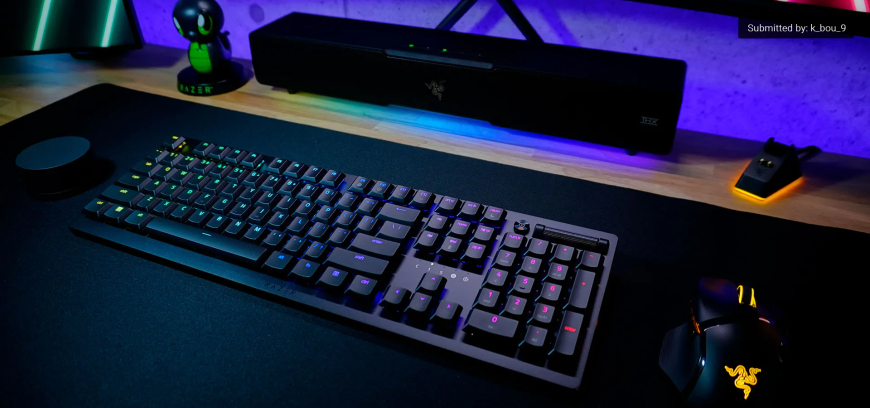
The Razer DeathStalker V2 Pro TKL takes a different approach to the modern gaming keyboard. Instead of a bulky chassis and tall mechanical switches, it pairs a compact tenkeyless layout with low-profile optical switches, wireless connectivity, and a slim aluminium build.
Razer positions the DeathStalker V2 Pro TKL as a keyboard built for fast gaming while remaining practical for everyday desktop use. Its feature set includes 2.4GHz HyperSpeed Wireless, Bluetooth 5.0, per-key RGB lighting, programmable controls, and support for Razer’s Snap Tap input feature.
Design and Build Quality
The tenkeyless layout removes the dedicated number pad, leaving a more compact footprint than a full-size keyboard. That gives a gaming setup more room around the mouse while keeping the standard navigation and function keys that are useful outside games.
The keyboard uses a low-profile design with a 5052 aluminium alloy top case and coated ABS keycaps. Razer also uses unique stabilisers for its low-profile keys, so some standard Razer PBT and Phantom keycap upgrade sets aren’t compatible with the DeathStalker V2 line. Razer’s support documentation provides additional information about the model and its software.
Low-Profile Optical Switches
The keyboard is available with Razer low-profile optical switches in linear and clicky versions. The linear option offers a smooth key feel, while the clicky version provides more tactile and audible feedback.
Razer rates the switches for up to 70 million keystrokes and uses a shorter actuation design intended to reduce key travel. The result is a keyboard aimed at users who prefer a faster, flatter typing and gaming experience rather than the deeper feel of conventional mechanical keyboards. Razer’s product specifications detail the available switch options and construction.
Wireless Connectivity
Wireless performance is one of the strongest parts of the DeathStalker V2 Pro TKL’s specification sheet. It supports Razer HyperSpeed Wireless over 2.4GHz for gaming and Bluetooth 5.0 for connecting to other devices.
The keyboard can also switch between multiple Bluetooth devices using dedicated profile buttons. A wired USB-C connection is also available, giving users another option for charging or when wireless connectivity isn’t needed.
Gaming Features and Snap Tap
Razer includes several features aimed specifically at gaming. The keyboard supports N-key rollover, anti-ghosting, a gaming mode, fully programmable keys, on-the-fly macro recording, and 1,000Hz polling.
It also supports Razer Snap Tap through Synapse 4. The feature prioritises the latest input between two selected directional keys, allowing certain movement changes to happen without releasing the previous key.
That feature comes with an important limitation for competitive Counter-Strike 2 players. Valve has said that hardware-based input automation such as Snap Tap Mode is not permitted on its official servers, meaning players using the keyboard for CS2 should disable the feature before joining those matches. Valve’s Counter-Strike 2 announcement explains the restriction.
Controls and Software
A dedicated media button and volume roller make the keyboard useful beyond gaming. Users can control media playback and volume without leaving their application, while Razer Synapse offers customisation and programmable controls.
The keyboard also includes per-key Razer Chroma RGB lighting. For users who prefer a cleaner setup, they can adjust or turn off the lighting. At the same time, the low-profile design keeps the keyboard visually restrained compared with many traditional gaming keyboards.
Battery Life
Battery life depends heavily on lighting and usage settings. Razer advertises up to 200 hours under its stated conditions, while its technical support documentation lists 50 hours for the DeathStalker V2 Pro Tenkeyless. The difference reflects the importance of lighting and operating conditions when evaluating wireless keyboard battery claims.
The keyboard can operate through a wired USB-C connection while charging, so users don’t have to stop using it when the battery needs replenishing. Razer’s official product page provides the manufacturer’s current battery information and usage details.
Pros and Cons
Pros:
- Compact tenkeyless design leaves more desk space for mouse movement
- Low-profile optical switches offer a shorter key-travel design
- 2.4GHz HyperSpeed Wireless, Bluetooth 5.0, and USB-C connectivity
- Per-key RGB lighting and extensive software customisation
- Dedicated media controls and volume roller
- Supports Razer Snap Tap through Synapse 4
Cons:
- No dedicated number pad because of the TKL layout
- No wrist rest is included
- No USB pass-through
- Snap Tap has restrictions in Counter-Strike 2 on Valve official servers
- Low-profile switches may not suit users who prefer a taller, deeper mechanical keyboard feel
Final Verdict
The Razer DeathStalker V2 Pro TKL is built around a clear idea: deliver a serious wireless gaming keyboard without the size and height associated with many traditional mechanical models. Its combination of low-profile optical switches, a compact layout, HyperSpeed Wireless, Bluetooth, RGB customisation, and dedicated media controls gives it a broad feature set.
Its appeal largely depends on whether the user wants a low-profile typing experience. Gamers who prefer compact keyboards and short key travel have plenty to work with here. At the same time, users who want a deeper mechanical feel, a number pad, or additional desk accessories may need to look elsewhere.
What's Your Reaction?
 Like
0
Like
0
 Dislike
0
Dislike
0
 Love
0
Love
0
 Funny
0
Funny
0
 Angry
0
Angry
0
 Sad
0
Sad
0
 Wow
0
Wow
0